4. Database
This chapter describes the following:
Building the Database: instructions on how to build the database
Database Structure: the structure of the database and its associated tables
GridPath Input Data: details on the various types of input data that can be loaded into the database
Database Input Validation: instructions on how to validate the database inputs
4.1. Building the Database
4.1.1. Creating the Database
Create an empty GridPath database with the appropriate table structure.
The user may specify the name and location of the GridPath database path using the –database flag.
>>> gridpath_create_database --database PATH/DO/DB
The default schema for the GridPath SQLite database is in db/db_schema.sql.
To create a database for GridPath raw data, point to the schema in ../data_toolkit/raw_data_db_schema.sql instead and also specify the –omit_data flag.
4.1.2. Populating the Database
Example Input Data
For the purposes of this section, you may use the example CSV files provided
in the gridpath/db/csvs_test_examples folder. Please ensure that you
download the CSV files from the same version of GridPath that you are using,
as the database structure may change between versions. Find your version of
GridPath here, download the
source code for your version, and copy the contents of the
gridpath/db/csvs_test_examples folder to your local machine. You can
then point the GridPath database-building tools to this directory
(PATH/DO/DB). See the Database Structure and
GridPath Input Data for an explanation of the database
structure and its tables.
Loading Input Data
The gridpath_load_csvs command ports the input data provided through CSV files to the GridPath SQLite database. It assumes that the user has already created the database file and loaded the GridPath schema using the gridpath_create_database command.
The gridpath_load_csvs command takes several arguments. For usage info, run:
>>> gridpath_load_csvs --help
The user must specify the GridPath database path using the –database flag and the path to the directory where the CSVs are located using the –csv_location flag.
>>> gridpath_load_csvs --database PATH/DO/DB --csv_location PATH/TO/CSVS
Running the command above will look for the csv_structure.csv file in the PATH/TO/CSVS directory and use the information in this file to determine which CSV files to import. The template csv_structure.csv file is located in the db/cvs_test_examples directory. This file has the list of all the subscenarios and associated tables in the GridPath database. CSV data is imported if the user specifies a path in the path column of the file. This path should be relative to the PATH/TO/CSVS directory. Other columns of this file should not be modified by the user with the exception of the cols_to_exclude_str column. In this column, the user can specify a string, which, if it is the beginning of the header of a column in the CSV input file, will tell the port script to ignore the data in that column instead of attempting to import it.
The script will look for CSV files in the path specified by the user for each subscenario.
If no name has been specified for a subscenario/table in the filename column of the csv_structure.csv file, the script is expecting that the CSV filename will conform to a certain structure, indicating the ID and name of the subscenario the file contains data for, with the ID and name separated by an underscore. For example, to load data for different project portfolio subscenarios, the user must first specify the path where the project portfoio CSVs are located in the path column of the project_portfolio_scenario_id row of the csv_structure.csv file. In this directory, the user must include a file for each portfolio they want to be able to model, e.g. 1_base.csv for project_portfolio_scenario_id 1 and 2_extra_project.csv for project_portfolio_scenario_id 2. CSVs for subscenarios flagged with 1 in the sub_input_flag column of the csv_structure.csv file require that the filename consist of the project name, subscenario ID, and subscenario name, separated by dashes, e.g. two profiles for a project named ‘Solar’ can be specified in the files named Solar-1-base.csv and Solar-2-high.csv respectively. Note that project filenames should not include dashes. Use the same format for transmission lines and reservoirs. To tell GridPath what the column name is for these types of inputs, include it in the sub_input_column field (e.g., project, transmission_line, or reservoir).
The user can specify that a subscenario ID is based on another “default” subscenario ID. This is done by ending the CSV filename for the subscenario ID with a dash followed by the default subscenario ID. For example, 3_base_with_change-1.csv indicates that the subscenario ID 3 should use values from the default subscenario ID 1 except for the values specified in the 3_base_with_change-1.csv. .. warning:: This functionality is new and hasn’t been extensively used and tested yet, so please proceed with caution.
A few subscenarios consist of multiple tables data for which is located inside CSVs in the same directory. For these subscenarios, the directory name should begin with the subscenario ID followed by an underscore and then the scenario name. The names of the files expected inside the directory are specified in the csv_structure.csv file in the filename column. For example, a temporal_scenario_id directory must contain files named period_params.csv, horizon_params.csv, structure.csv, and horizon_timepoints.csv.
The scenarios.csv under the scenario folder contains the subscenario ID specifications for each scenario to be loaded. The user-defined name of the scenario should be entered as the name of the scenario column.
Creating Scenarios
You can use the gridpath_load_scenarios command to create, update, or delete a scenario. You can create a single or multiple scenarios from a CSV. This command assumes that the user has already created the database file using the gridpath_create_database command and loaded input data for the scenario using the gridpath_load_csvs command.
The gridpath_load_scenarios command takes several arguments. For usage info, run:
>>> gridpath_load_scenarios --help
The user must specify the GridPath database path using the –database flag and the path to the directory where the scenario CSV is located using the –csv_path flag.
>>> gridpath_load_scenarios --database PATH/DO/DB --csv_path PATH/TO/SCENARIO/CSV
If you are using the csvs_test_examples directory included with GridPath, /PATH/TO/SCENARIO/CSV can be set to ../csvs_test_examples/scenarios.csv.
To load a single scenario by name, use the –scenario flag. To delete a scenario from the database, specify the scenario name with the –scenario flag and use the –delete flag.
4.2. Database Structure
The database consists of a set of tables that store input data for GridPath scenarios. Each table has a specific structure and set of required and optional fields. The database also contains tables that store metadata about the scenarios, such as the list of subscenarios that make up a scenario and the features that are enabled for a scenario.
All tables names in the GridPath database start with one of seven prefixes:
mod_, subscenario_, inputs_, scenarios,
options_, status_, or ui_. This structure is meant to
organize the tables by their function. Below are descriptions of each table
type and its role, and of the kind of data tables of this type contain.
4.2.1. The mod_ Tables
The mod_ should not be modified except by developers. These contain
various data used by the GridPath platform to describe available
functionality, help enforce input data consistency and integrity, and aid in
validation.
4.2.2. The subscenario_ and inputs_ Tables
Most tables in the GridPath database have the subscenario_ and
inputs_ prefix. With a few exceptions, for each subscenario_
table, there is a respective inputs_ table (i.e. the tables have the
same name except for the prefix). This is because the subscenario_
tables contain the descriptions of the input data contained in the
inputs_ tables. For example the inputs_system_load may
contain three different load profiles – low, mid, and high; the
subscenarios_system_load will then contain three rows, one for each
load profile, with its description and ID. The pairs of subscenario_
and inputs_ are linked via an ID column: in the case of the system
load tables, that is the load_scenario_id column. We call these
shared table keys subscenario IDs, as we use them to create a full
GridPath scenario in the scenarios table.
4.2.3. The scenarios Table
In GridPath, we use the term ‘scenario’ to describe a model run with a
particular set of inputs. Some of those inputs stay the same from scenario to
scenario and others we vary to understand their effect on the results. For
example, we could keep some input types like the zonal and transmission
topography, temporal resolution, resource availability, and policy
requirements the same across scenarios, but vary other input types, e.g. the
load profile, the cost of solar, and the operational characteristics of coal,
to create different scenarios. We call each of those inputs types a
‘subscenario’ since they are the building blocks of a full scenario. In
GridPath, you can create a scenario by populating a row of the
scenarios table. The columns of the scenarios table are
linked one of the ‘building blocks’ – the data in inputs_ tables –
via the respective subscenario ID.
For example, the load_scenario_id column of the scenarios table
references the load_scenario_id column of the
subscenarios_system_load table, which in turn determines which load
profile contained in the inputs_system_load table the scenario
should use. In our example with three different load profiles, the data for
which are contained in the inputs_system_load table,
subscenarios_system_load will contain three rows with values of 1,
2, and 3 respectively in the load_scenario_id column; in the
scenarios table, the user would then be able to select a value of 1,
2, or 3 in the load_scenario_id column to determine which load
profile the scenario should use. Similarly, we would select the solar costs
to use in the scenario via the projects_new_cost_scenario_id column
of the scenarios table (which is linked to the
subscenarios_project_new_cost and inputs_project_new_cost
tables) and the operational characteristics of coal to use via the
project_operational_chars_scenario_id column (which is linked to the
subscenarios_project_operational_chars and
inputs_project_operational_chars tables).
4.2.4. The options_ Tables
Some GridPath run options can be specified via the database in the
options_ tables. Currently, this includes the solver options that
can be specified for a scenario run
4.2.5. The status_ Tables
GridPath keeps track of scenario validation and run status. The scenario
status is recorded in the scenarios table (in the
validation_status_id and run_status_id columns) and an
additional detail can be found in the status_ tables. Currently,
this includes a single table: the status_validation table, which
contains information about errors encountered during validation for each
scenario that has been validated.
4.2.6. The ui_ Tables
The ui_ tables are used to include and exclude components of the
GridPath user interface.
4.2.7. The viz_ Tables
The viz_ tables are used in the GridPath visualization suite, for
instance when determining in which color and order to plot the technologies in
the dispatch plot.
4.3. GridPath Input Data
A minimal set of inputs for a GridPath scenario would generally includes temporal inputs, load zone inputs, system load inputs, a project portfolio and load zones, and project operating characteristics. You can look for the inputs labeled as core in the csv_structure.csv file in db/csvs_test_examples.
4.3.1. Temporal Inputs
Relevant tables:
|
|
|
N/A |
|
|
|
|
The first step in building the GridPath database is to determine the temporal span and resolution of the scenarios to be run. See the Temporal Setup for a detailed description of the types of temporal inputs in GridPath.
The user must decide on temporal resolution and span, i.e. timepoints (e.g. hourly, 4-hourly, 15-minute, etc.) and how the timepoints are connected to each other in an optimization: 1) what the horizon(s) is (are), e.g. we can see as far ahead as one day, one week, or a full 8760 in making operational decisions and 2) what period a timepoint belongs to, with a period being the time when investment decisions are made, so depending on a period a different set of resources is available in a particular timepoint. In addition, the user has to specify whether all timepoints are optimized concurrently, or if they are split into subproblems (e.g. the full year is solved a week at a time in a production-cost scenario). Finally, the temporal inputs also define whether the scenario will have stages, i.e. whether some results from one stage will be fixed and fed into a subsequent stage with some inputs also potentially changed.
The subscenarios table has the temporal_scenario_id column as its
primary key. This ID refers to a particular set of timepoints and how they
are linked into horizons, periods, subproblems, and stages. For
example, we could be running production cost for 2020 (the period simply a
year in this case with no investment decisions), but optimize each day
individually in one scenario (the subproblem is the day) and a week at a
time in another scenario (the subproblem is a week). We have the same
timepoints in both of those scenarios but they are linked differently into
subproblems, so these will be two different temporal_scenario_id’s.
Another example might be to use the same sample of “representative” days to
optimize investment and dispatch between 2021 and 2050, but group the days
depending on what year they belong to (30 periods = higher resolution on
investment decisions) in one scenario and what decade they belong to in
another scenario (3 periods = lower resolution on investment decisions). In
this case we would have the same timepoints and horizons (as well as a single
subproblem and a single stage), but they would be grouped differently into
periods, so, again, we’d need two different temporal_scenario_id’s.
Descriptions of the relevant tables are below:
The subscenarios_temporal_timepoints contains the IDs, names, and
descriptions of the temporal scenarios to be available to the user. This
table must be populated before data for the respective
temporal_scenario_id can be imported into the input tables.
The inputs_temporal: for a given temporal scenario, the
timepoints along with their horizon and period as well as the “resolution”
of each timepoint (is it an hour, a 4-hour chunk, 15-minute chunk, etc.)
The inputs_temporal_subproblems tables contains the subproblems for
each temporal_scenario_id (usually used in production-cost modeling,
set to 1 in capacity-expansion scenarios with a single subproblem).
The inputs_temporal_subproblems_stages table contains the information
about whether there are stages within each subproblem. Stages must be given
an ID and can optionally be given a name.
The inputs_temporal_periods table contains the information about the
investment periods in the respective temporal_scenario_id along with
the data for the discount factor to be applied to the period and the number of
years it represents (e.g. we can use 2030 to represent the 10-year period
between 2025 and 2034).
The inputs_temporal_horizons table contains information about the
horizons within a temporal_scenario_id along their balancing type,
period, and boundary (‘circular’ if the last timepoint of the horizon is
used as the previous timepoint for the first timepoint of the horizon and
‘linear’ if we ignore the previous timepoint for the first timepoint of the
horizon).
The inputs_temporal table contains information about the
timepoints within each temporal_scenario_id, subproblem_id, and
stage_id, including the period of the timepoint, its ‘resolution’ (the
number of hours in the timepoint), its weight (the number of timepoints not
explicitly modeled that this timepoint represents), the ID of the timepoint
from the previous stage that this timepoint maps to (if any), whether this
timepoint is part of a spinup or lookahead, the month of this timepoint, and
the hour of day of this timepoint. Timepoint IDs must be unique.
The inputs_temporal_horizon_timepoints table describes how timeponts
are organized into horizons for each temporal_scenario_id, subproblem_id, and
stage_id. A timepoint can belong to more than one horizon if those horizons
are of different balancing types (e.g. the same horizon can belong to a
‘day’ horizon, a ‘week’ horizon, a ‘month’ horizons, and a ‘year’ horizon).
A scenario’s temporal setup is selected via the temporal_scenario_id
column of the scenarios table.
4.3.2. Load Zone Inputs
Relevant tables:
|
|
|
N/A |
|
|
|
|
The subscenarios_geography_load_zones contains the IDs, names, and
descriptions of the load zone scenarios to be available to the user. This
table must be populated before data for the respective
load_zone_scenario_id can be imported into the input table.
The user must decide the load zones will be, i.e. what is the unit at which
load is met. There are some parameters associated with each load zone,
e.g. unserved-energy and overgeneration penalties. The relevant database
table is inputs_geography_load_zones where the user must list the
load zones along with whether unserved energy and overgeneration should be
allowed in the load zone, and what the violation penalties would be. If a
user wanted to create a different ‘geography,’ e.g. combine load zones, add
a load zone, remove one, have a completely different set of load zones, etc.,
they would need to create a new load_zone_scenario_id and list the
load zones. If a user wanted to keep the same load zones, but change the
unserved energy or overgeneration penalties, they would also need to create
a new load_zone_scenario_id.
Separately, each generator to be included in a scenario must be assigned a load zone to whose load-balance constraint it can contribute (see Project Geography).
GridPath also includes other geographic layers, including those for operating reserves, reliability reserves, and policy requirements.
A scenario’s load zone geographic setup is selected via the
load_zone_scenario_id column of the scenarios table.
4.3.3. System Load
Relevant tables:
|
|
|
N/A |
|
|
|
|
|
|
|
|
|
|
|
|
|
|
|
|
The load to be used in a scenario must be specified in the
inputs_system_load table under a load_scenario_id key via two
subscenarios: load_components_scenario_id and
load_levels_scenario_id.
The load_components_scenario_id determines which load components to
include for each load zone. In GridPath, the total static load is built up
from its components, e.g., the total static load can be the sum of a base
load profile and various electrification loads (EVs, building end uses, and so
on). The load profiles associated with each of those load components are
stored in the inputs_system_load_levels table and are associated with a
load_levels_scenario_id.
If the load for one load zone changes but not for others, all must be
included again under a different load_levels_scenario_id. The
inputs_system_load_levels table can contain data for load_zones and
timepoints not included in a scenario. GridPath will only select the load for
the relevant load zones and timepoints based on the
load_zone_scenario_id and temporal_scenario_id selected by the
user for the scenario in the scenarios table.
4.3.4. Project Inputs
Generator and storage resources in GridPath are called projects. Each
project can be assigned different characteristics depending on the scenario,
whether its geographic location, ability to contribute to reserve or policy
requirements, its capacity and operating characteristics. You can optionally
import all projects that may be part of a scenario in the
inputs_project_all table of the GridPath database.
Project Geography
Relevant tables:
|
|
|
N/A |
|
|
|
|
Each project in a GridPath scenario must be assigned a load zone to whose
load-balance constraint it will contribute. In the
inputs_project_load_zones, each
project_load_zone_scenario_id should list all projects with their load
zones. For example, if a user initially had three load zones and assigned
one of them to each project, then decided to combine two of those load
zones into one, they would need to create a new
project_load_zone_scenario_id that includes all projects from the
two combined zones with the new zone assigned to them as well as all
projects from the zone that was not modified. This
inputs_project_load_zones table can include more projects that are
modeled in a scenario, as GridPath will select only the subset of projects
from the scenario’s project portfolio (see
Project Portfolio).
Project Portfolio
Relevant tables:
|
|
|
N/A |
|
|
|
|
A scenario’s ‘project portfolio’ determines which projects to include in a
scenario and how to treat each project’s capacity, e.g. is the capacity
going to be available to the optimization as ‘given’ (specified), will there
be decision variables associated with building capacity at this project, will
the optimization have the option to retire the project, etc. In GridPath,
this is called the project’s capacity_type (see
Project Capacity Types). You can view all implemented
capacity types in the mod_capacity_types table of the database.
The relevant database table is for the projet
portfolio data is inputs_project_portfolios. The primary key of this
table is the project_portfolio_scenario_id and the name of the
project. A new project_portfolio_scenario_id is needed if the user
wants to select a different list of projects to be included in a scenario or
if she wants to keep the same list of projects but change a project’s capacity
type. In the latter case, all projects that don’t require a ‘capacity type’
change would also have to be listed again in the database under the new
project_portfolio_scenario_id. All
project_portfolio_scenario_id’s along with their names and
descriptions must first be listed in the
subscenarios_project_portfolios table.
Specified Projects
Capacity
Relevant tables:
|
|
|
N/A |
|
|
|
|
If the project portfolio includes project of the capacity types
gen_spec, gen_ret_bin, gen_ret_lin, or
stor_spec, the user must select that amount of project capacity that
the optimization should see as given (i.e. specified) in every period as
well as the associated fixed O&M costs (see
Fixed Costs). Project
capacities are in the inputs_project_specified_capacity table. For
gen_ capacity types, this table contains the project’s power rating
and for stor_spec it also contains the storage project’s energy rating.
The primary key of this table includes the
project_specified_capacity_scenario_id, the project name, and the
period. Note that this table can include projects that are not in the
user’s portfolio: the utilities that pull the scenario data look at the
scenario’s portfolio, pull the projects with the “specified” capacity types
from that, and then get the capacity for only those projects (and for the
periods selected based on the scenario’s temporal setting). A new
project_specified_capacity_scenario_id would be needed if a user wanted
to change the available capacity of even only a single project in a single
period (and all other project-year-capacity data points would need to be
re-inserted in the table under the new
project_specified_capacity_scenario_id).
Fixed Costs
Relevant tables:
|
|
|
N/A |
|
|
|
|
If the project portfolio includes project of the capacity types
gen_spec, gen_ret_bin, gen_ret_lin, or
stor_spec, the user must select the fixed O&M costs associated with
the specified project capacity in every period. These can be varied by
scenario via the project_specified_fixed_cost_scenario_id subscenario.
The treatment for specified project fixed cost inputs is similar to that for their capacity (see Capacity).
New Projects
Capital Costs
Relevant tables:
|
|
|
N/A |
|
|
|
|
If the project portfolio includes projects of a ‘new’ capacity type
(gen_new_bin, gen_new_lin, stor_new_bin, or
stor_new_lin), the user must specify the cost for building a project
in each period and, optionally, any minimum and maximum requirements on the
total capacity to be build (see Potential).
Similarly to the specified-project tables, the primary key is the
combination of project_new_cost_scenario_id, project, and period, so if
the user wanted the change the cost of just a single project for a single
period, all other project-period combinations would have to be re-inserted in
the database along with the new project_new_cost_scenario_id. Also note that
the inputs_project_new_cost table can include projects that are not
in a particular scenario’s portfolio and periods that are not in the
scenario’s temporal setup: each capacity_type module has utilities
that pull the scenario data and only look at the portfolio selected by the
user, pull the projects with the ‘new’ capacity types from that list, and
then get the cost for only those projects and for the periods selected in
the temporal settings.
Note that capital costs must be annualized outside of GridPath and input as
$/MW-yr in the inputs_project_new_cost table. For storage projects,
GridPath also requires an annualized cost for the project’s energy
component, so both a $/MW-yr capacity component cost and a $/MWh-yr energy
component cost is required, allowing GridPath to endogenously determine
storage sizing.
Potential
Relevant tables:
|
|
|
N/A |
|
|
|
|
If the project portfolio includes projects of a ‘new’ capacity type
(gen_new_bin, gen_new_lin, stor_new_bin, or
stor_new_lin), the user may specify the minimum and maximum
cumulative new capacity to be built in each period in the
inputs_project_new_potential table. For storage project, the minimum
and maximum energy capacity may also be specified. All columns are optional
and NULL values are interpreted by GridPath as no constraint. Projects that
don’t either a minimum or maximum cumulative new capacity constraints can be
omitted from this table completely.
Project Availability
Exogenous
Relevant tables:
|
|
|
|
Within each project_availability_scenario_id, a project of the
exogenous availability type can point to a particular
exogenous_availability_scenario_id, the data for which is contained
in the inputs_project_availability_exogenous table. The names and
descriptions of each project and
exogenous_availability_scenario_id combination are in the
subscenarios_project_availability_exogenous table. The availability
derate for each combination is defined by stage and timepoint, and must be
between 0 (full derate) and 1 (no derate).
Endogenous
Relevant tables:
|
|
|
|
Within each project_availability_scenario_id, a project of the
binary or continuous availability type must point to a
particular endogenous_availability_scenario_id, the data for which
is contained in the inputs_project_availability_endogenous table. The
names and descriptions of each project and
endogenous_availability_scenario_id combination are in the
subscenarios_project_availability_endogenous table. For each
combination, the user must define to the total number of hours that a
project will be unavailable per period, the minimum and maximum length of
each unavailability event in hours, and the minimum and maximum number of
hours between unavailability events. Based on these inputs, GridPath determines
the exact availability schedule endogenously.
Project Operational Characteristics
Relevant tables:
|
|
|
N/A |
|
|
|
|
The user must decide how to model the operations of projects, e.g. is this
a fuel-based dispatchable (CCGT) or baseload project (nuclear), is it an
intermittent plant, is it a battery, etc. In GridPath, this is called the
project’s operational type. All implemented operational types are listed
in the mod_operational_types table.
Each operational type has an associated set of characteristics, which must
be included in the inputs_project_operational_chars table. The primary
key of this table is the project_operational_chars_scenario_id,
which is also the column that determines project operational characteristics
for a scenario via the scenarios table, and the project. If a
project’s operational type changes (e.g. the user decides to model a coal
plant as, say, gen_always_on instead of gen_commit_bin) or the
user wants to modify one of its operating characteristics (e.g. its minimum
loading level), then a new project_operational_chars_scenario_id must
be created and all projects listed again, even if the rest of the projects’
operating types and characteristics do not change.
The ability to provide each type of reserve is currently an ‘operating
characteristic’ determined via the inputs_project_operational_chars
table.
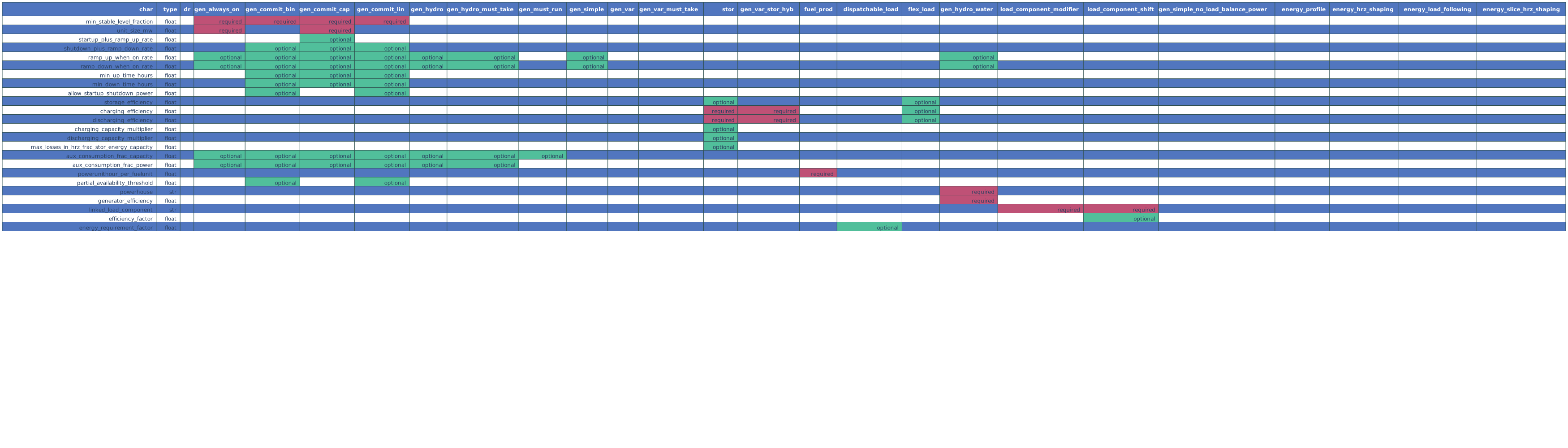
Not all operational types have all the characteristics in
the inputs_project_operational_chars. GridPath’s validation suite
does check whether certain required characteristic for an operational type are
populated and warns the user if some characteristics that have been filled
are actually not used by the respective operational type. See the matrix below
for the required and optional characteristics for each operational type.
Several types of operational characteristics vary by dimensions are other
than project, so they are input in separate tables and linked to the
inputs_project_operational_chars via an ID column. These include
heat rates, variable generator profiles, and hydro characteristics.
Relevant tables:
key column |
|
|
|
|
|
Fuel-based generators in GridPath require a heat-rate curve to be specified
for the project. Heat rate curves are modeled via piecewise linear
constraints and must be input in terms of an average heat rate for a load
point. These data are in the inputs_project_heat_rate_curves for
each project that requires a heat rate, while the names and descriptions of
the heat rate curves each project can be assigned are in the
subscenarios_project_heat_rate_curves. These two tables are linked
to each other and to the inputs_project_operational_chars via the
heat_rate_curves_scenario_id key column. The inputs table can contain
data for projects that are not included in a GridPath scenario, as the
relevant projects for a scenario will be pulled based on the scenario’s
project portfolio subscenario.
Variable Generator Profiles
Relevant tables:
key column |
|
|
|
|
|
Variable generators in GridPath require a profile (power output as a fraction
of capacity) to be specified for the project for each timepoint in which
it can exist in a GridPath model. Profiles are in the
inputs_project_variable_generator_profiles
for each variable project and timepoint, while the names and descriptions of
the profiles each project can be assigned are in the
subscenarios_project_variable_generator_profiles. These two tables
are linked to each other and to the inputs_project_operational_chars
via the variable_generator_profile_scenario_id key column. The
inputs_project_variable_generator_profiles table can contain data
for projects and timepoints that are not included in a particular GridPath
scenario: GridPath will select the subset of projects and timepoints based
on the scenarios project portfolio and temporal subscenarios.
Hydro Operational Characteristics
Relevant tables:
key column |
|
|
|
|
|
Hydro generators in GridPath require that average power, minimum power, and
maximum power be specified for the project for each balancing
type/horizon in which it can exist in a GridPath model. These inputs are in
the inputs_project_hydro_operational_chars
for each project, balancing type, and horizon, while the names and
descriptions of the characteristis each project can be assigned are in the
subscenarios_project_hydro_operational_chars. These two tables
are linked to each other and to the inputs_project_operational_chars
via the hydro_operational_chars_scenario_id key column. The
inputs_project_hydro_operational_chars table can contain data
for projects and horizons that are not included in a particular GridPath
scenario: GridPath will select the subset of projects and horizons based
on the scenarios project portfolio and temporal subscenarios.
4.3.5. Transmission Inputs
Optional inputs needed if transmission feature is enabled for a scenario.
Transmission Portfolio
Relevant tables:
|
|
|
|
|
|
|
|
Transmission Topography
Relevant tables:
|
|
|
|
|
|
|
|
Specified Transmission
Capacity
Relevant tables:
|
|
|
|
|
|
|
|
New Transmission
Capital Costs
Relevant tables:
|
|
|
|
|
|
|
|
Transmission Operational Characteristics
Relevant tables:
|
|
|
|
|
|
|
|
4.3.6. Fuel Inputs
Fuel Characteristics
Relevant tables:
|
|
|
|
|
|
Fuel Prices
Relevant tables:
|
|
|
|
|
|
4.3.7. Reserves
Regulation Up
Balancing Areas
Relevant tables:
|
|
|
|
|
|
|
|
Contributing Projects
Relevant tables:
|
|
|
|
|
|
|
|
Requirement
Relevant tables:
|
|
|
|
|
|
|
|
Regulation Down
Balancing Areas
Relevant tables:
|
|
|
|
|
|
|
|
Contributing Projects
Relevant tables:
|
|
|
|
|
|
|
|
Requirement
Relevant tables:
|
|
|
|
|
|
|
|
Spinning Reserves
Balancing Areas
Relevant tables:
|
|
|
|
|
|
|
|
Contributing Projects
Relevant tables:
|
|
|
|
|
|
|
|
Requirement
Relevant tables:
|
|
|
|
|
|
|
|
Spinning Reserves
Balancing Areas
Contributing Projects
Requirement
Relevant tables:
|
|
|
|
|
|
|
|
Load-Following Reserves Up
Balancing Areas
Relevant tables:
|
|
|
|
|
|
|
|
Contributing Projects
Relevant tables:
|
|
|
|
|
|
|
|
Requirement
Relevant tables:
|
|
|
|
|
|
|
|
Load-Following Reserves Down
Balancing Areas
Relevant tables:
|
|
|
|
|
|
|
|
Contributing Projects
Relevant tables:
|
|
|
|
|
|
|
|
Requirement
Relevant tables:
|
|
|
|
|
|
|
|
Frequency Response Reserves
Balancing Areas
Relevant tables:
|
|
|
|
|
|
|
|
Contributing Projects
Relevant tables:
|
|
|
|
|
|
|
|
Requirement
Relevant tables:
|
|
|
|
|
|
|
|
Policy
Energy Targets, e.g. Renewables Portfolio Standard (RPS)
Policy Zones
Relevant tables:
|
|
|
|
|
|
|
|
Contributing Projects
Relevant tables:
|
|
|
|
|
|
|
|
Target
Relevant tables:
|
|
|
|
|
|
|
|
Carbon Cap
Policy Zones
Relevant tables:
|
|
|
|
|
|
|
|
Contributing Projects
Relevant tables:
|
|
|
|
|
|
|
|
Target
Relevant tables:
|
|
|
|
|
|
|
|
4.4. Database Input Validation
Once you have built the database with a set of scenarios and associated inputs, you can test the inputs for a given scenario by running the inputs validation suite. This suite will extract the inputs for the scenario of interest and check whether the inputs are valid. A few examples of invalid inputs are:
required inputs are missing
inputs are the wrong datatype or not in the expected range
inputs are inconsistent with a related set of inputs
inputs are provided but not used
After the validation is finished, any encountered input validations are dumped
into the status_validation table. This table contains the following
columns:
scenario_id: the scenario ID of the scenario that is validated.
subproblem_id: the subproblem ID of the subproblem that is validated (the validation suite validates each subproblem separately).
stage_id: the stage ID of the stage that is validated (the validation suite validates each stage separately).
gridpath_module: the GridPath module that returned the validation error.
related_subscenario: the subscenario that is related to the validation error.
related_database_table: the database table that likely contains the validation error.
issue_severity: the severity of the validation error. “High” means the model won’t be able to run. “Mid” means the model might run, but the results will likely be unexpected. “Low” means the model should run and the results are likely as expected, but there are some inconsistencies between the inputs.
issue_type: a short description of the type of validation error.
issue_description: a detailed description of the validation error.
timestamp: lists the exact time when the validation error encountered.
To run the validation suite from the command line, navigate to the
gridpath/gridpath folder and type:
validate_inputs.py --scenario SCENARIO_NAME --database PATH/TO/DATABASE
Note that the input validation suite is not exhaustive and does not catch every possible input error. As we continue to develop and use GridPath, we expect that the set of validation tests will expand and cover more and more of the common input errors.